 VibeSlash
Claude Code · Codex · slash command helper
Claude Code & Codexcommand cheat sheet
No memorizing —one keystroke away.
VibeSlash covers every commonly used Claude Code and OpenAI Codex slash command, each with a description, when to use it and an example. The browser extension suggests commands as soon as you type / on the web; the Windows and macOS apps open with a hotkey in the Claude and ChatGPT desktop apps and the terminal, detect which tool you are using and insert the command you pick.
Download for freeAll Claude Code commandsAll Codex commands
Why VibeSlash
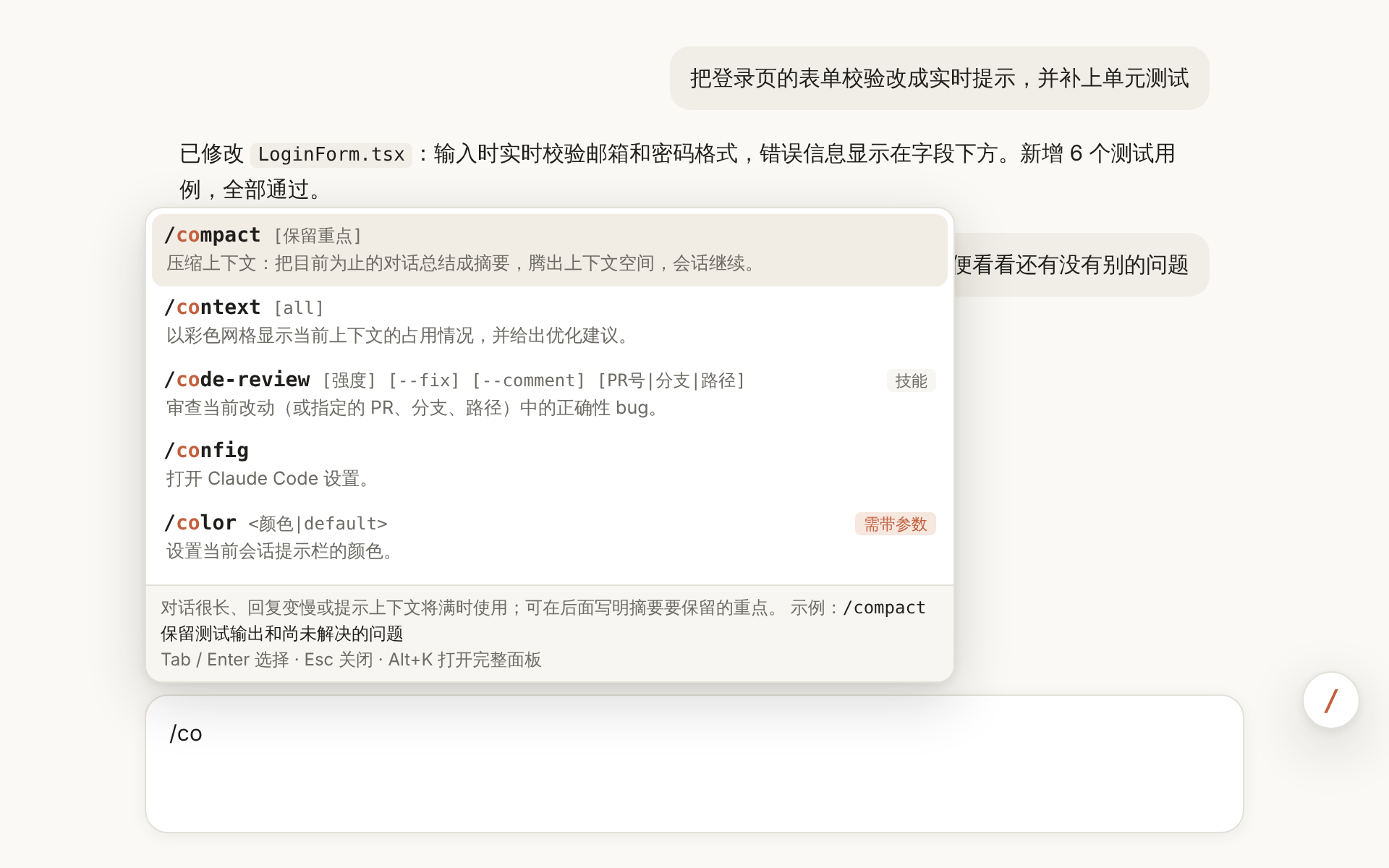
Type / and get suggestions
Type / at the start of the prompt on Claude Code for the web and matching commands appear above it. Press Enter to insert.
Fuzzy search
Type a few letters — “secrev” finds /security-review, “comp” finds /compact. Recently used commands come first.
Detects your tool
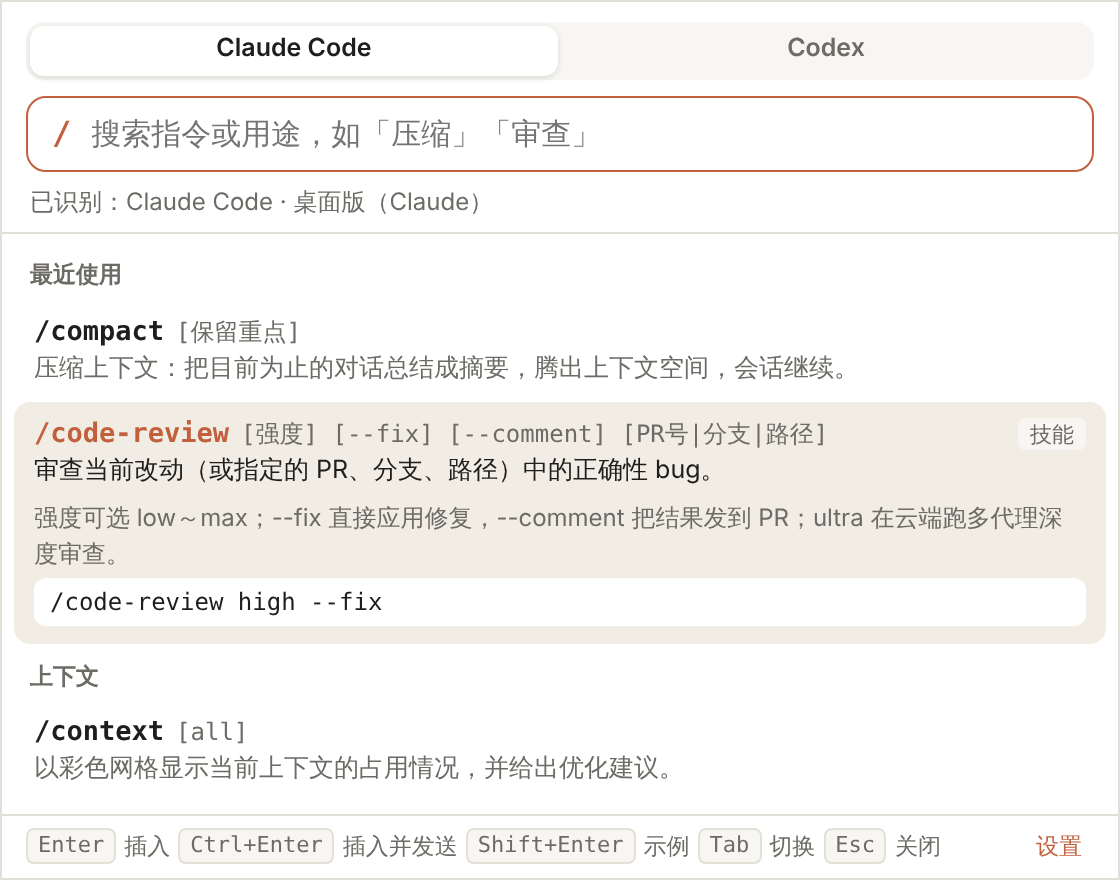
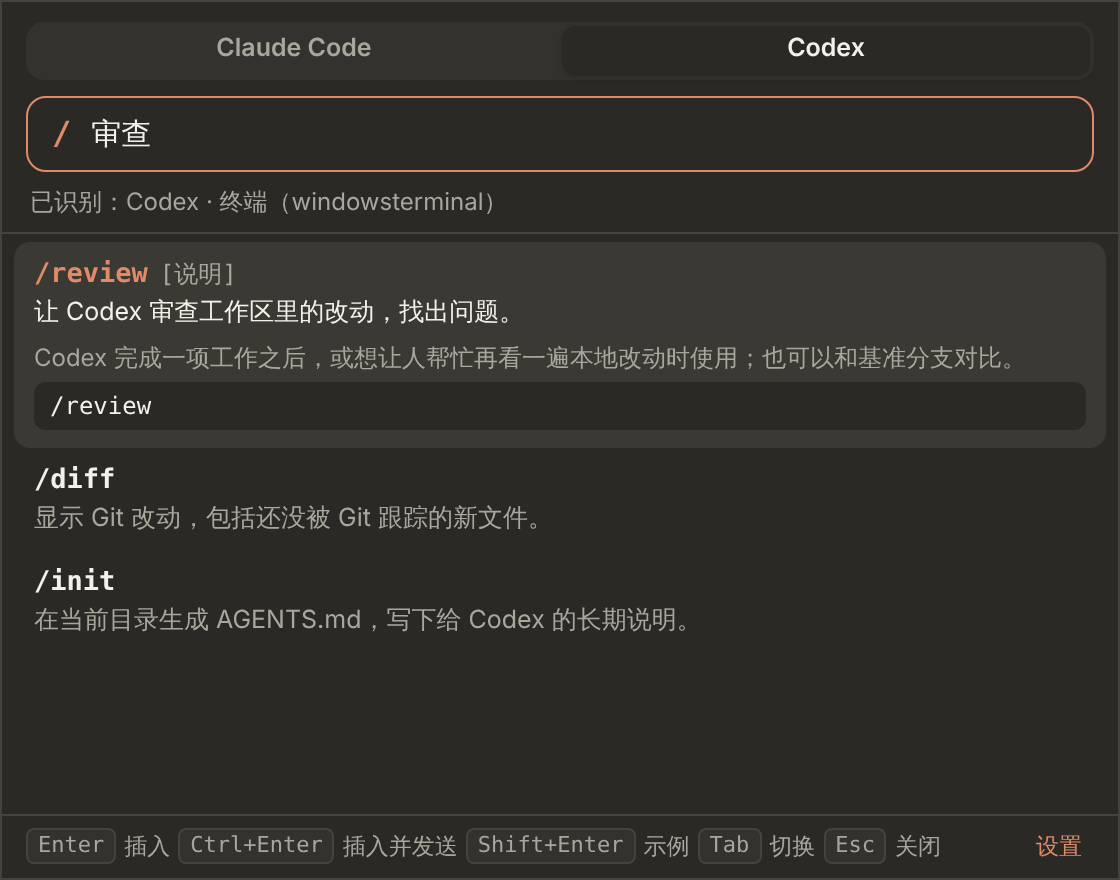
The desktop app looks at the active window — the Claude desktop app, ChatGPT’s Codex mode, or claude / codex running in a terminal — and shows only the commands that work there.
Opens next to the input box
The palette appears right by the input box and inserts the command into it. Ctrl/⌘ + Enter inserts and sends.
Knows where each command works
Commands that need an argument on the web (such as /model) and Codex commands that only work in the terminal or IDE are labeled and explained.
So small you won’t notice it
The extension is 52 KB, the Windows installer 1.3 MB and the macOS installer 1 MB. No .NET, Java or Node.js needed — ready in seconds.
Private by design
No network requests, no access to your conversations; settings stay on your machine. Free and open source.
Desktop apps: press Alt + / in Claude, ChatGPT or a terminal
Press the hotkey in the Code tab of the Claude desktop app, in ChatGPT’s Codex mode, or in a terminal running claude / codex. The palette opens next to the input box and switches to that tool’s commands automatically. In the desktop apps you can also just type /, as in the browser extension, or click the floating / button (drag it anywhere, or turn it off in settings).
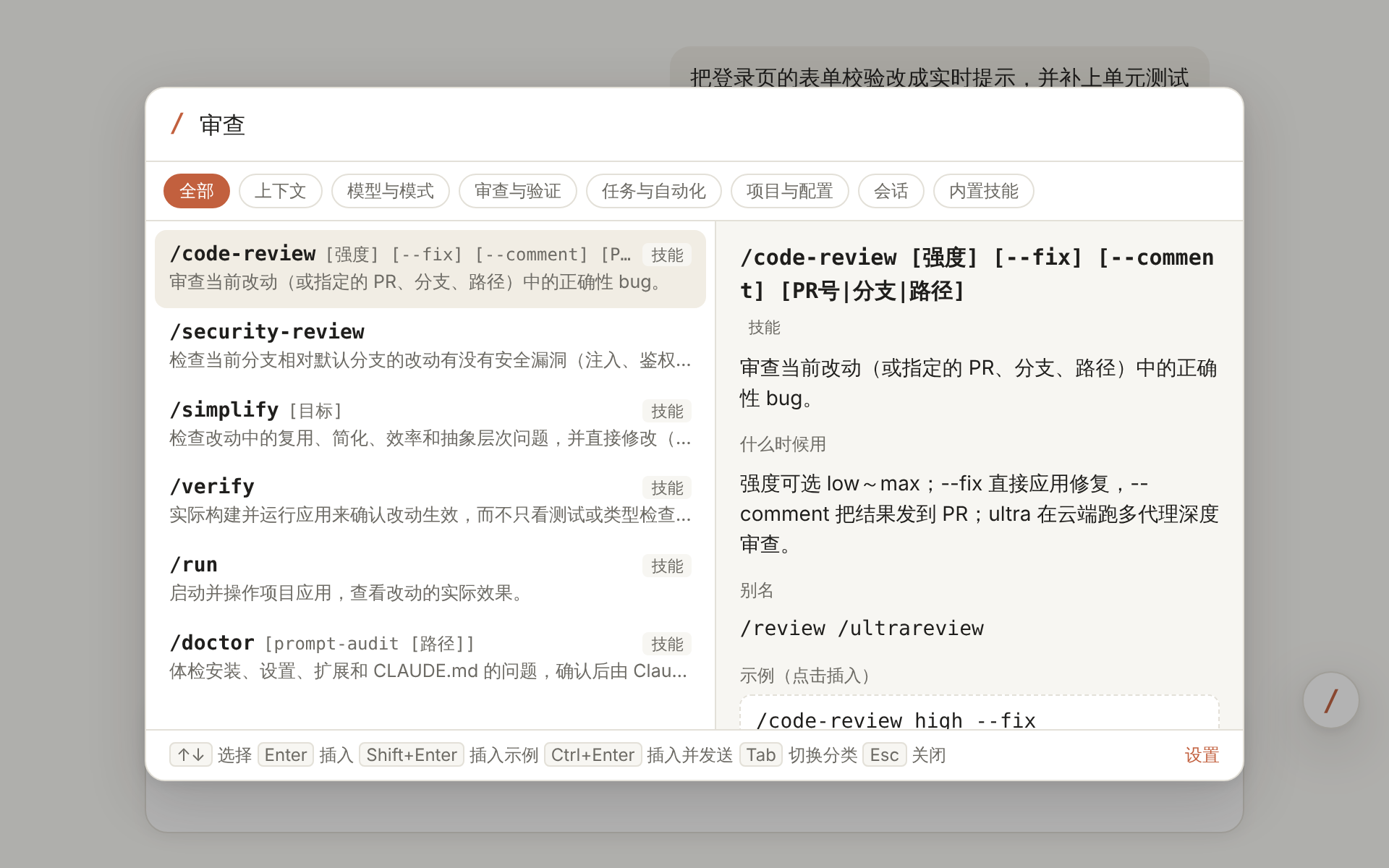
Browser extension: a command palette for Claude Code on the web
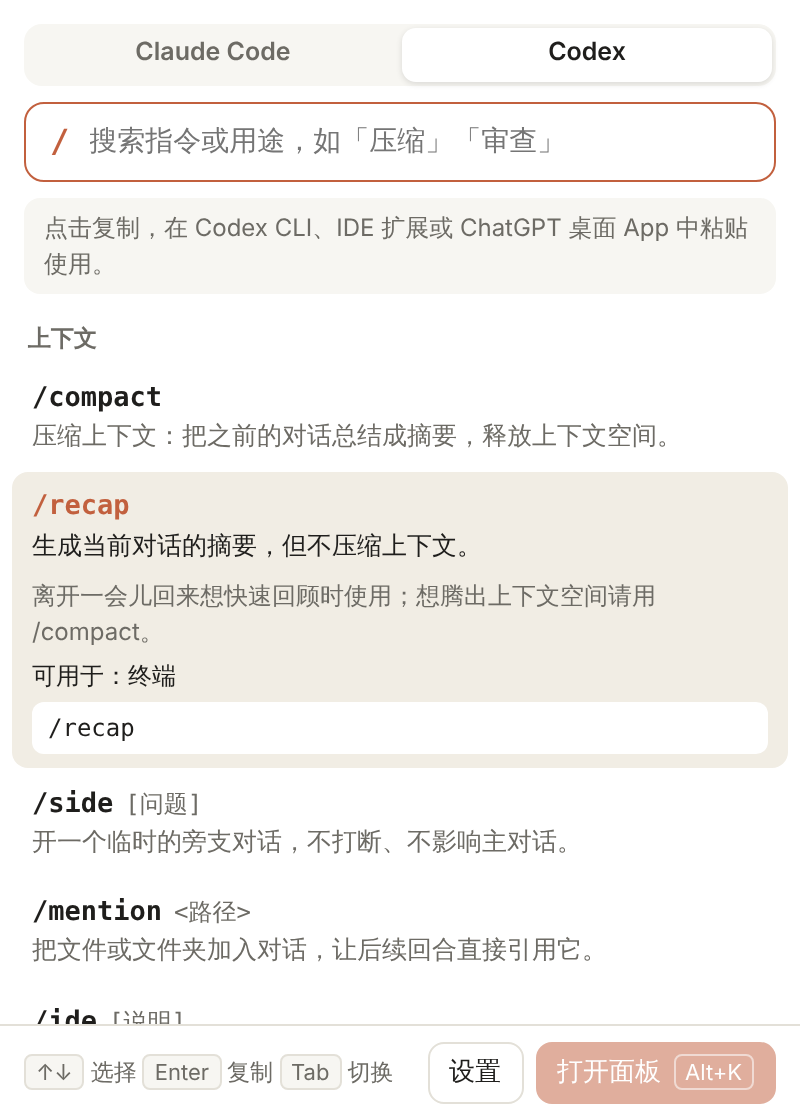
Press Alt + K to open the full palette, browse by category and see arguments, usage, examples and web-specific caveats. Click the toolbar icon for a quick Codex command reference.
Download for free
Slash-command suggestions and an Alt+K palette on Claude Code for the web; Codex quick reference in the popup.
Get it → WindowsWindows 10 / 11 · 1.3 MBLives in the tray. Press Alt + / in Claude, ChatGPT or a terminal.
Get it → macOSmacOS 14+ · 1 MBLives in the menu bar. Press ⌥ /. Universal: Apple silicon and Intel.
Get it →Preview builds are not signed yet: on Windows choose “More info → Run anyway”; on macOS right-click VibeSlash and choose “Open” the first time.
Command reference
All Claude Code commands
42 slash commands — Context, Models & modes, Review & verification, Tasks & automation, Project & configuration, Session, Built-in skills — with descriptions and examples.
See all →All Codex commands
63 slash commands — Context, Models & permissions, Review & changes, Workspace & run location, Session, Skills & extensions, Settings & diagnostics — with descriptions and examples.
See all →All DeepSeek commands
6 slash commands — Modes & permissions, Context, Session — with descriptions and examples.
See all →FAQ
What is VibeSlash?
VibeSlash is a free, open-source cheat sheet and launcher for Claude Code and Codex slash commands, available as a browser extension and as Windows and macOS apps. Type / at the start of the input box to get suggestions, or press a hotkey to open the full palette; every command comes with a description, when to use it and an example.
Which tools does it support?
The browser extension supports Claude Code for the web (claude.ai/code) in Chrome and Edge. The desktop apps support the Claude desktop app (Code tab), ChatGPT’s Codex mode, the DeepSeek Harness desktop app, and the Claude Code and Codex CLIs running in a terminal or editor — and detect which one you are using.
How big is VibeSlash?
Tiny: the extension is 52 KB, the Windows installer 1.3 MB and the macOS installer 1 MB. The desktop apps need no .NET, Java or Node.js runtime — the Windows app uses the system’s built-in WebView2 and the macOS app is native.
How do I use the desktop app?
After installing, it runs in the tray (Windows) or the menu bar (macOS). Press Alt + / (⌥ / on macOS) in Claude, ChatGPT or a terminal; the palette opens next to the input box. Search, press Enter to insert, or Ctrl/⌘ + Enter to insert and send. In the desktop apps you can also type / at the start of the input box, or click the floating / button.
Do Codex commands work on ChatGPT on the web?
No. According to OpenAI’s docs, Codex slash commands only work in the Codex CLI, the IDE extension and the Codex mode of the ChatGPT desktop app; ChatGPT on the web has its own command menu. On the web, VibeSlash only offers a Codex reference you can copy from.
Does it support DeepSeek?
Yes. DeepSeek Harness, DeepSeek’s official agent, has slash commands such as /plan, /goal and /compact, and VibeSlash documents them. The desktop apps detect the DeepSeek Harness desktop app, and the browser popup has a quick reference. If you run Claude Code on DeepSeek’s API, as DeepSeek’s docs describe, you are using Claude Code’s commands — see the Claude Code command list.
What’s the difference between /compact and /clear?
/compact summarizes the conversation so far to free up context and keeps the session going; /clear starts a new conversation with empty context. Claude Code on the web doesn’t support /clear — start a new session from the sidebar instead.
Why do /model and /effort need an argument on the web and in the desktop app?
The web and desktop apps don’t show the terminal’s interactive pickers, so you pass the value directly, e.g. /model opus or /effort high. VibeSlash labels these commands “requires an argument” and shows an example.
Does it collect my data?
No. VibeSlash makes no network requests and never reads your conversations; settings and usage history stay on your machine. The desktop apps use Accessibility (macOS) or simulated keystrokes only to find the input box and insert the command you choose.
Is the app available in English?
Not yet. The extension and desktop apps currently show their interface and command descriptions in Chinese; command names, arguments and examples work the same in any language. This website has the full command reference in English.
Is it free?
Yes, completely free, with the source code on GitHub.